Questions & answers
Anything unanswered? One email: [email protected]
Getting started
Is the trial really free?
Yes — 14 days, every feature, no card, no account. Enter an email, speak, done. One trial per computer.
How does dictating actually work?
Press the hotkey (Ctrl+Shift+D out of the box - change it in
Settings to anything you like), speak, press it again. Your words are typed
into whatever has focus - browser, Word, chat, your code editor. There is no
special window to paste from; the cursor is the destination.
What happens when the 14 days are up?
The app locks and shows the license window - nothing is uninstalled, nothing deleted. Your settings, history, and downloaded models all stay put. Enter a key and you continue exactly where you left off.
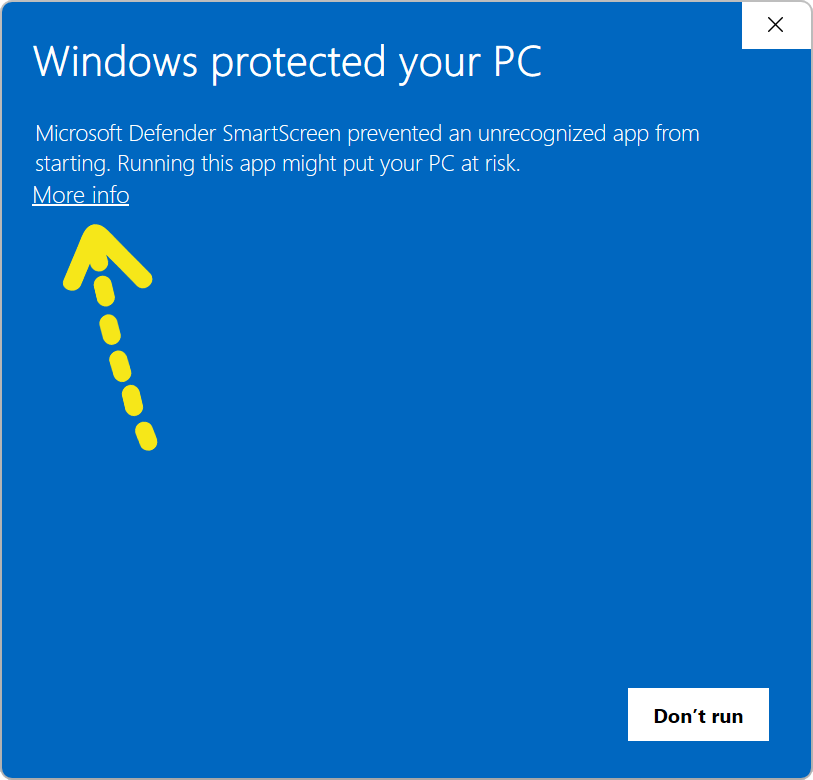
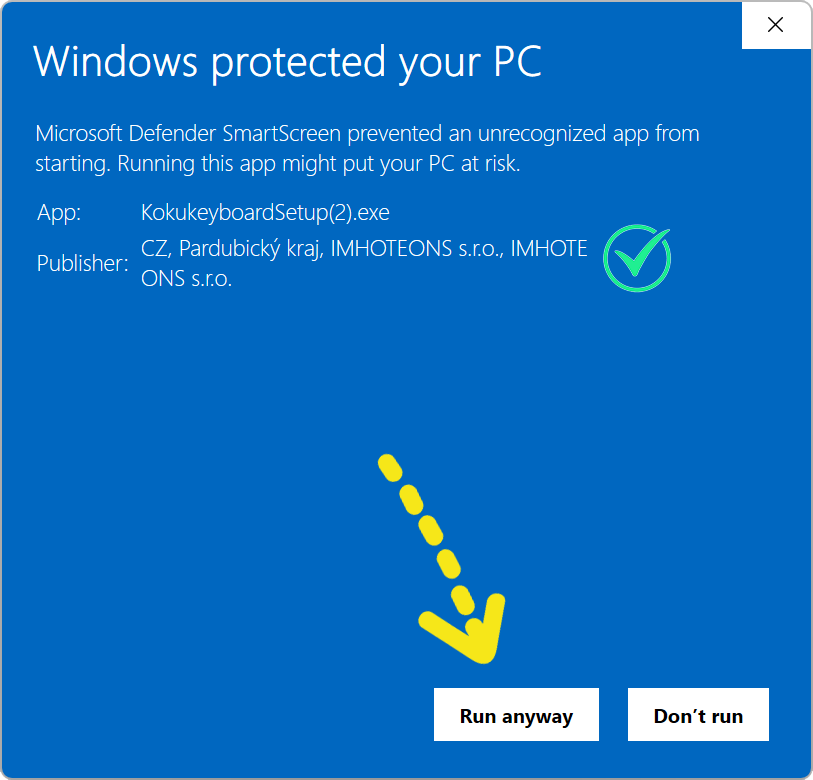
Windows showed a warning when I ran the installer.
The installer is digitally signed by IMHOTEONS s.r.o. - the company behind Kokukeyboard. Windows SmartScreen can still be wary of newly released apps while they build a reputation. Click "More info", confirm the publisher reads IMHOTEONS s.r.o., then "Run anyway":
Do I need internet?
Only twice: once to download the AI model (it lives on your computer afterwards), and briefly for activation. Dictation itself works fully offline — on a plane, in a tent, anywhere. The app quietly re-checks its license when you happen to be online; a paid license survives around three months fully offline between checks.
Where does my voice go?
Nowhere. The AI (open-source Whisper) runs entirely on your machine — no audio, no transcripts, nothing ever uploaded. That's not a setting; there is simply no upload code. The honest part →
Your license
Where is my license key?
In the email you received right after purchase — subject line "Your Kokukeyboard license key". Check spam if it's shy. The same email has a one-click activation button; keep it, it's your proof of ownership.
Nothing arrived — did I mistype my email?
Most likely, and you're already looked after. If the key email bounces because the address doesn't exist, we notice within minutes and refund your purchase automatically — you don't need to write to us or track anything down. The money goes back the way it came; your bank usually shows it within a few business days. Once you see the refund, simply buy again with the correct address and your key arrives in seconds. Prefer a human? [email protected] is always here — but you really don't have to.
How many computers can I use?
Every license covers 2 computers (desktop + laptop, typically). Need more? Extra computers cost $2.49 each, added in a minute from the app's License window — up to 6 in total.
Several people use one computer — do we all need licenses?
No. A license belongs to the computer, not the Windows account. Every Windows user on the same machine can use the same key — just paste it once in their own session (tray icon → License…). It still counts as one computer.
I got a new computer — how do I move my license?
Today: send one email to [email protected] with your key and we free the old seat within a business day — then activate on the new machine as usual. (A self-service "deactivate this computer" button is coming in an update.)
I reinstalled Windows / the app.
Just activate again with the same key — a reinstall on the same computer doesn't use up a seat.
Money
What does it cost — and is it really once?
$14.99, once, forever — including updates. No subscription. The optional Pro tier ($69, or upgrade for exactly the $54.01 difference) adds batch transcription of audio files and whole folders. Prefer monthly? The Patient Path is $2.49/month — after 10 payments the app is simply yours, and you can buy out the remainder anytime for less.
How does the Patient Path work, exactly?
$2.49/month for 10 months ($24.90 in total), and the full app is yours from the very first payment. Buy out early whenever you like - the buy-out price drops $1.50 for every month you've already paid. Cancel and the app simply pauses; resume and it comes right back, with your paid months still counting.
At checkout our payment provider (Lemon Squeezy) shows this as a monthly subscription - that's just how their system labels any recurring plan. It is really a fixed 10-payment plan: after your 10th payment we automatically end the subscription, so you are never charged an 11th time.
What exactly does Pro add?
Batch transcription: hand it audio files - or whole folders of them - and get the text back. Pro also covers a 3rd computer. Everyday dictation is identical in both tiers; Pro is for people with recordings to transcribe. The full Pro story →
Refunds?
30 days, no questions, self-service: the Deserter's Gate. Your license stops working; your settings stay on your computer in case you return.
Practical
Which Windows? Mac?
Windows 10 and 11 (64-bit), and macOS. Mac users download the installer from the site - the link switches to the .dmg on a Mac; the Microsoft Store listing is Windows only.
Can I install it into Program Files?
By default Kokukeyboard installs just for you, into your own Programs folder
(%LOCALAPPDATA%\Programs) - no admin rights needed, and updates
stay one-click. If you'd rather have it in Program Files: right-click the
installer and choose Run as administrator, then pick the folder.
Windows itself requires admin rights to write there; that's a Windows rule,
not the app being difficult. Everything works the same either way.
Which languages can I dictate in?
90+, recognized automatically — or pin one in Settings for maximum accuracy.
Do I need a powerful computer or a graphics card?
No graphics card needed - the AI runs on your processor. Pick the model that fits your machine in Settings: the light ones are quick on any modern laptop, the big ones are more accurate but want more memory and a faster machine. You can switch models at any time, and try a few until one feels right.
Does each Windows user need their own model download?
Yes — models are stored per Windows user (a few hundred MB to a few GB, depending on the model you choose). Your models survive app updates and even uninstalling.
How do updates work?
The app checks quietly and offers updates in the tray — one click, your license and settings untouched.